

This article is part of the 7-part Testing LangGraph Applications series. The examples come from the langgraph-testing-demo repository.
Testing LangGraph Applications Series
- Stop Testing AI Outputs. Start Testing State
- How to Structure LangGraph Tests That Actually Scale
- Testing Isn’t Enough: Evaluating LangGraph Workflows That Actually Work
- Testing Parallel LangGraph Workflows Without Losing Control ← You are here
- Understanding LangGraph Workflows with LangSmith Traces and pytest
- Command vs Send in LangGraph: Choosing the Right Primitive
- What It Takes to Build Production-Ready LangGraph Systems
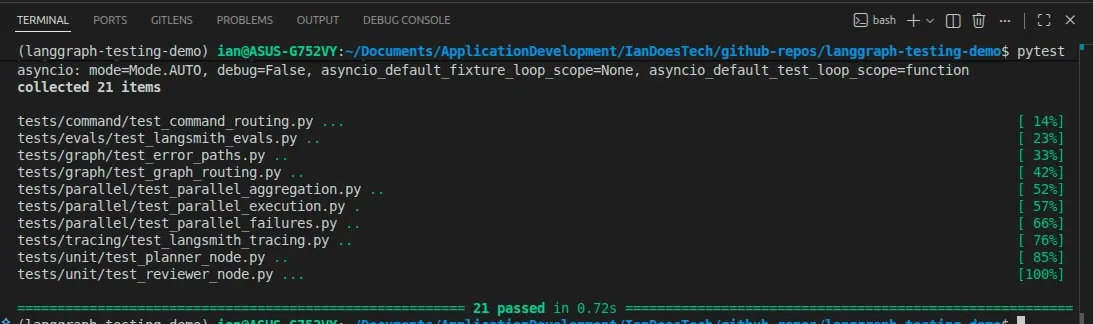
All examples in this article are backed by a pytest suite covering parallel execution, aggregation logic, and branch failure scenarios:
So far in this series, our LangGraph workflow has been simple.
- One node runs after another
- State flows in a straight line
- Behavior is easy to reason about
Then you add parallel branches.
And suddenly…
everything gets harder to reason about.
What Changes When You Add Parallel Branches
Up to now, our graph looked like this:
Planner → Researcher → Reviewer → WriterOnce you introduce parallelism, it becomes something like:
Planner → [Researcher A, Researcher B, Researcher C] → Aggregator → ReviewerInstead of a single research step, you now have:
- Multiple workers running concurrently
- Multiple partial results
- A merge step before continuing
In LangGraph, this kind of parallelism can be implemented in a few ways:
Send→ when you want to fan out many similar tasks to the same node (e.g. processing a list of items)Command→ when an orchestrator chooses between different downstream nodes (e.g.send_email,send_slack,send_tweet)- Static parallel edges → when branches are fixed and always run
The implementation details vary.
The testing problem does not.
No matter how you build it, you now have multiple branches producing state that must be merged safely.
Visualizing Send-Based Parallelism
The demo workflow for this article looks like this:
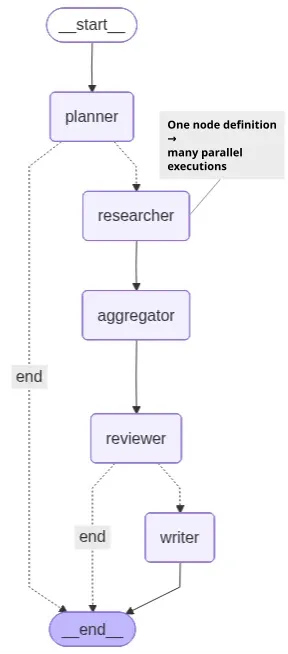
One node definition → many parallel executions
One important detail is that both the Mermaid diagram and LangGraph Studio only display the researcher node once.
That can initially be confusing because the workflow is actually spawning multiple parallel researcher executions.
In the demo, the planner generates three research tasks, which means the runtime effectively executes:
researcher(task_1)
researcher(task_2)
researcher(task_3)
in parallel.
However, Send does not create new graph nodes.
Instead, it creates multiple parallel invocations of the same node definition.
Conceptually, the execution behaves more like:
planner
  ├─ researcher(task_1)
  ├─ researcher(task_2)
  └─ researcher(task_3)
But structurally, the graph still contains only a single researcher node.
That distinction is important because it explains why Send is ideal for:
- Fan-out / fan-in workflows
- Processing collections of similar work
- Parallel execution of homogeneous tasks
Whereas Command is usually a better fit when routing to different downstream nodes with different responsibilities.
Parallelism Introduces New Failure Modes
Your earlier tests assumed:
- A single execution path
- A single output
- Deterministic flow
Those assumptions no longer hold.
Here are the kinds of issues you now need to think about:
Partial Success
Some workers succeed. Others fail.
- Do you continue with partial data?
- Do you fail the entire graph?
This is a design decision, not just a technical detail.
Missing Results
What if a worker:
- Times out
- Crashes
- Never returns
Your system needs to decide:
- Wait?
- Retry?
- Proceed without it?
Inconsistent Outputs
Different workers may produce:
- Conflicting conclusions
- Different formats
- Overlapping or redundant data
Your aggregator needs to handle this cleanly.
Ordering Issues
Parallel execution means:
- Results arrive in unpredictable order
If your logic depends on ordering, you’ll get subtle bugs.
Your aggregation logic must be order-independent.
Why Your Existing Tests Are No Longer Enough
In earlier posts, we tested:
- Node logic (unit tests)
- Routing (graph tests)
- Failures (error tests)
That worked because:
- There was one path through the system
- State changed in a predictable sequence
With parallelism:
- Multiple paths execute at once
- State is produced concurrently
- Results must be merged
If you keep your old testing strategy, you’ll miss entire classes of bugs.
The Aggregation Pattern
Parallelism is only useful if you can combine results reliably.
A common pattern is:
research_results: list[str]Each worker produces one result.
The aggregator node:
- Collects all results
- Merges them into a single structure
- Prepares state for downstream nodes
For example:
{
    "research_results": [
        "Result from worker A",
        "Result from worker B",
        "Result from worker C",
    ]
}
This becomes the input for your reviewer or writer.
What You Need to Test Now
Your testing strategy needs to evolve.
1. Fan-Out / Branch Execution Correctness
First, verify that parallel execution actually happens.
You want to know:
- Did all expected branches run?
- Did we get the expected number of results?
Example:
assert len(result["research_results"]) == 3This catches:
- Missing workers
- Incorrect routing logic
- Silent failures
2. Aggregation Logic
Next, test how results are combined.
You should verify:
- All results are included
- No data is lost
- The merge logic is correct
Most importantly:
The aggregation must be order-independent
A good test ensures that:
- The same logical inputs always produce the same merged result
- Even if execution order changes
3. Partial Failure Handling
This is where things get interesting.
Simulate:
- One branch failing
- Others succeeding
Then assert:
- Does the graph continue?
- Is the failure recorded in state?
- Is the final output still usable?
Or alternatively:
- Does the graph terminate safely?
There is no universal “correct” behavior.
What matters is that the behavior is explicit and tested.
4. Deterministic Testing Strategy
Parallel systems are naturally harder to test.
To keep your tests reliable:
- Use fake/deterministic worker outputs
- Control failure scenarios explicitly
- Avoid randomness
This allows you to test:
- Structure
- Logic
- Behavior
Without introducing flakiness.
Example Test Structure
Your test suite will likely evolve to include something like:
tests/graph/test_parallel_execution.pyThese tests focus on:
- Branch execution
- Aggregation correctness
- Failure handling under concurrency
They complement — not replace — your earlier tests.
Async and Concurrency
Parallel LangGraph workflows are commonly implemented using async nodes.
The good news:
- pytest continues to work cleanly
- You can keep using
@pytest.mark.asyncio - No major tooling changes are required
Technically, LangGraph can execute parallel branches with either synchronous or asynchronous nodes.
However, async nodes are usually the better fit for real-world concurrent workloads involving:
- LLM calls
- APIs
- databases
- external services
because they avoid blocking while waiting on I/O.
The complexity isn’t in the tooling.
It’s in the logic and state management.
The Real Shift
Parallelism doesn’t just add performance.
It adds state complexity.
You move from:
- One state evolving over time
To:
- Multiple states being produced and merged
And if that merge logic isn’t:
- explicit
- tested
- deterministic
You lose control of the system.
Connecting It All Together
Across this series, we’ve built up a layered approach:
- Treat LangGraph as a state machine
- Structure tests properly (unit, graph, failure)
- Evaluate outputs with datasets
- Handle parallelism with explicit aggregation and testing
Each step builds on the last.
Parallelism is where all of that discipline becomes essential.
What’s Next
At this point, you have the foundations for:
- Reliable workflows
- Meaningful tests
- Measurable quality
- Scalable orchestration
From here, you can explore:
- More advanced aggregation strategies
- Hybrid human + AI evaluation loops
- Production monitoring and observability
Final Thought
Parallel workflows are powerful.
But they’re also where most systems become:
- Hard to reason about
- Hard to debug
- Hard to trust
If you don’t test them properly.
Build them with intent. Test them with discipline.
And you’ll end up with systems that are not just fast…
But reliable.