

This article is part of the 7-part Testing LangGraph Applications series. The examples come from the langgraph-testing-demo repository.
Testing LangGraph Applications Series
- Stop Testing AI Outputs. Start Testing State ← You are here
- How to Structure LangGraph Tests That Actually Scale
- Testing Isn’t Enough: Evaluating LangGraph Workflows That Actually Work
- Testing Parallel LangGraph Workflows Without Losing Control
- Understanding LangGraph Workflows with LangSmith Traces and pytest
- Command vs Send in LangGraph: Choosing the Right Primitive
- What It Takes to Build Production-Ready LangGraph Systems
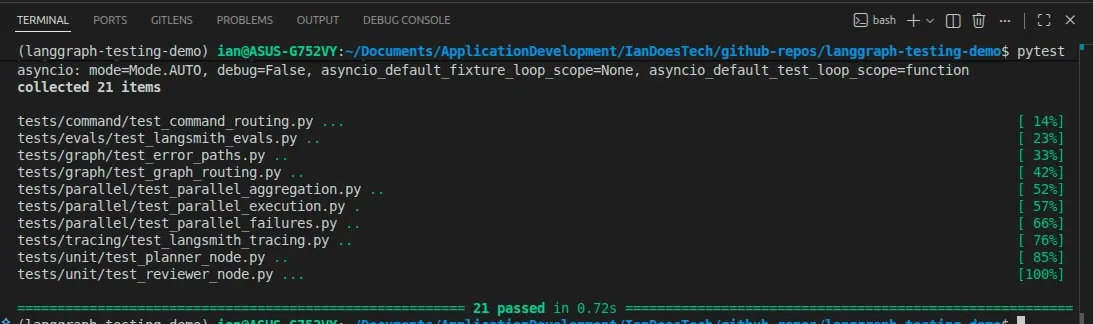
All examples in this article are backed by a full pytest suite covering unit tests, graph behavior, and failure scenarios:
Many LangGraph examples I’ve seen focus on whether the final answer “looks good”, but I soon learned that approach hides problems once workflows become more complex.
If you’re only checking the output, it’s much harder to understand what the system is actually doing.
To build reliable AI workflows, I believe it’s much better to stop thinking in terms of prompts and start thinking in terms of state and transitions.
The Problem with “Output-Based” Testing
A common approach to testing AI systems looks like this:
- Run the workflow
- Inspect the final output
- Decide if it’s “good enough”
This approach has a few obvious problems:
- Outputs are non-deterministic
- Tests become brittle
- Failures are hard to debug
- You have no visibility into why something went wrong
This is especially problematic in systems like LangGraph, where the real complexity isn’t the output but the workflow itself.
The Shift: LangGraph as a State Machine
I think a better mental model is this:
A LangGraph workflow is a state machine with explicit transitions
Each node:
- Receives state
- Produces a partial update
- Influences what happens next
Instead of testing outputs, you test:
- State transitions
- Routing decisions
- Error propagation
- Retry behavior
Once you make this shift, the system becomes far more testable.
A Simple (but Real) Example
This article is based on a small demo repository:
pytestThat’s all you need to run everything shown below.
The workflow itself looks like this:
Planner → Researcher → Reviewer → Writer
                      ↑
                    (retry)
The interesting part isn’t the happy path. It’s the reviewer.
The reviewer can:
- Approve → continue to writer
- Reject → send the graph back to researcher
- Error → terminate the workflow
At that point, the workflow behaves more like a graph with branching and loops than a simple pipeline.
State Is the Contract
At the center of this system is a shared state object (state.py).
It contains both:
Data
planresearchfinal_output
Control signals
review_statuserrorsresearch_attemptsreview_attempts
In practice, this ends up being extremely useful.
State isn’t just data. It’s the contract that defines system behavior
Once your state is explicit and typed, everything else becomes easier:
- Nodes become predictable
- Routing becomes transparent
- Tests become meaningful
What to Test Instead
Instead of asking:
“Did we get a good answer?”
Ask:
- Did the graph take the correct path?
- Did retries happen when expected?
- Did failures stop execution?
- Was state updated correctly?
For example, in tests/graph/test_graph_routing.py:
result = await graph.ainvoke({"user_input": "retry path example"})

assert result["review_status"] == "approved"
assert result["research_attempts"] == 2
This tells you:
- The reviewer rejected the first attempt
- The graph correctly routed back to the researcher
- The second attempt succeeded
This lets you test the workflow behavior itself instead of relying on whether the final output happens to look reasonable.
Unit Testing Nodes
Each node is designed to behave like a small, focused function:
- Input: state
- Output: partial state update
- No hidden mutations
That makes unit testing straightforward.
For example, in tests/unit/test_reviewer_node.py:
result = await reviewer({"research": "Insufficient notes."})

assert result["review_status"] == "rejected"
You can also test edge cases:
- Missing input
- Retry limits
- Error handling
Because the node logic is deterministic, these tests are stable and meaningful.
Testing Failure Paths (Where Most Systems Break)
Understandably, a lot of demos ignore failure paths, but these are usually where production systems become difficult.
In this project, failure scenarios are covered in:
tests/graph/test_error_paths.pyThese tests simulate failures like:
- Researcher crashing
- Reviewer throwing an exception
Example:
assert result["review_status"] == "error"
assert result["errors"] == ["reviewer failed: review service unavailable"]
This gives you:
- Clear failure signals
- Predictable behavior
- Confidence that the system won’t silently degrade
Testing the Graph, Not Just the Nodes
Unit tests are only part of the picture. You also need graph-level tests.
These live in:
tests/graph/test_graph_routing.pyThey verify:
- Routing logic
- State progression across nodes
- End-to-end behavior
For example:
result = await graph.ainvoke({"user_input": "explain node testing"})

assert result["review_status"] == "approved"
assert result["final_output"].startswith("Final output for:")
This confirms that:
- The graph executed correctly
- The workflow reached completion
- The system behaved as expected
Testing vs Evaluation (They’re Subtly Different)
It also helps to separate testing from evaluation because they solve different problems.
Testing is about:
- Determinism
- Correct behavior
- System reliability
Evaluation is about:
- Output quality
- Usefulness
- LLM performance
In this project:
- pytest handles testing
- Evaluation lives in
tests/evals/test_langsmith_evals.py
You can run it the same way:
pytest(Some tests are skipped unless LANGSMITH_API_KEY is set.)
If your tests depend on LLM quality, they will eventually fail for the wrong reasons.
Why This Approach Works Better
Once you start treating LangGraph workflows as state machines instead of prompt chains, the testing story becomes much clearer.
- Easier to reason about
- More predictable under failure
- Simpler to debug
- Easier to maintain long term
That’s often where graph-based systems start becoming much easier to operate confidently.
What’s Next
In the next post, I’ll go deeper into:
- Structuring pytest suites for LangGraph
- Testing routing and error paths in detail
- Building confidence in more complex workflows
And later, we’ll extend this into:
- Parallel execution
- More advanced orchestration
- Evaluation with LangSmith
Final Thought
In practice, many AI workflow failures come from the surrounding system rather than the model output alone.
LangGraph gives you the tools to fix that, but you still need to test it like real software.