

This article is part of the 7-part Testing LangGraph Applications series. The examples come from the langgraph-testing-demo repository.
Testing LangGraph Applications Series
- Stop Testing AI Outputs. Start Testing State
- How to Structure LangGraph Tests That Actually Scale
- Testing Isn’t Enough: Evaluating LangGraph Workflows That Actually Work
- Testing Parallel LangGraph Workflows Without Losing Control
- Understanding LangGraph Workflows with LangSmith Traces and pytest
- Command vs Send in LangGraph: Choosing the Right Primitive ← You are here
- What It Takes to Build Production-Ready LangGraph Systems
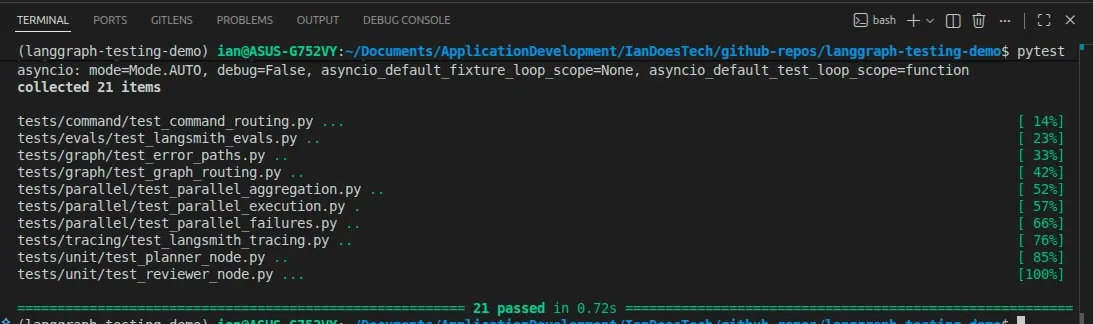
All examples in this article are backed by a pytest suite covering both Command-based control flow and Send-based parallel execution patterns:
When you first start using LangGraph, Send and Command can feel interchangeable, but in practice, they solve different problems.
You can use both to trigger multiple nodes. You can use both for parallel execution. And if you’re not careful, you’ll end up picking one arbitrarily.
That can make graphs harder to reason about later on.
Choosing the wrong primitive affects more than execution. It also changes how understandable and maintainable the graph becomes over time.
The Core Difference
A simple way to think about it is:
Send→ distributes workCommand→ controls flow
What Send Is For
Send is about data parallelism.
You take:
- one node
- multiple inputs
…and run the same logic multiple times.
Example:
research_tasks → Send → researcher (N times)This is exactly what we implemented in the parallel demo:
- planner creates multiple research tasks
- each task is processed by the same
researchernode - results are aggregated
This is basically a classic map-style pattern.
When Send is the right choice
Use Send when:
- You are processing a list of items
- The same logic applies to each item
- The number of tasks may vary
- You need to aggregate results afterward
Typical use cases:
- research pipelines
- retrieval + chunk processing
- scoring / ranking multiple items
What Command Is For
Command is about control flow.
It allows a node to decide:
- what happens next
- which nodes should run
- what state updates should accompany that decision
Example:
intent → Command → send_email / send_slack / send_tweetHere, you’re not repeating the same work.
You’re orchestrating different actions.
When Command is the right choice
Use Command when:
- You are routing between different nodes
- Each node represents a different behavior
- You want explicit orchestration logic
- You may trigger multiple actions in parallel
Typical use cases:
- notification systems (email, Slack, etc.)
- tool selection
- multi-agent orchestration
- user intent routing
A Subtle but Important Point
You might have seen guidance like:
“Command is the more modern primitive for parallel execution”
That’s only partially true.
A more precise way to say it is:
Commandis the more general primitive.Sendis the more specialized one.
Sendis optimized for fan-out of the same nodeCommandis designed for orchestration across different nodes
Both can produce parallel execution, but they represent different intent.
Real Example: Send (From This Repo)
In the parallel demo:
- planner generates research topics
- each topic is processed independently
- all results are merged
Conceptually:
["technical", "failures", "testing"]
   ↓
Send → researcher
   ↓
aggregation
This is clean because:
- the node is the same
- the structure is predictable
- testing focuses on aggregation and counts
Real Example: Command (New Pattern)
Now consider this:
user intent → notify systemThe system decides:
- send Slack message
- send email
- maybe do both
That node can return:
from langgraph.types import Command

return Command(
    goto=["send_slack", "send_email"],
    update={"notification_sent": True},
)
Conceptually, this is quite different from Send.
- Each node does different work
- There is no aggregation step
- The goal is orchestration, not distribution
Why This Distinction Matters
You can misuse these primitives.
If you do, the graph still runs, but it becomes harder to reason about.
If you misuse Send
Using Send for orchestration leads to:
- unclear intent
- awkward state structures
- unnecessary aggregation logic
You’re forcing a data-parallel pattern onto a control-flow problem.
If you misuse Command
Using Command for data fan-out leads to:
- over-complicated routing logic
- unnecessary branching
- harder-to-test graphs
You’re turning a simple map problem into orchestration.
Testing Implications
This ties directly back to earlier posts.
Testing Send
Focus on:
- number of outputs
- aggregation correctness
- handling partial failures
Example:
assert len(result["research_results"]) == 3Testing Command
Focus on:
- correct routing decisions
- correct nodes executed
- absence of unintended paths
Example:
assert "slack_sent" in result
assert "email_sent" in result
Hybrid Patterns
In real systems, you often combine both.
Example:
Command → choose research strategy
   ↓
Send → execute multiple research tasks
Here:
Commanddecides what to doSenddecides how to scale it
This pattern scales nicely in more complex workflows.
Practical Rules
If you’re unsure which to use, ask:
Are you distributing work?
- Same node
- Multiple inputs
- Aggregation required
👉 Use Send
Are you orchestrating behavior?
- Different nodes
- Explicit decisions
- Multiple actions
👉 Use Command
The Main Distinction
You can use both Send and Command to trigger multiple nodes, but they represent different mental models:
Sendscales workCommandcontrols flow
Once the distinction becomes unclear, graphs usually become harder to reason about and test.
Use them correctly, and your system stays clean as it grows.
What’s Next
At this point, we’ve covered:
- state design
- testing
- evaluation
- parallelism
- observability
- orchestration
The final step is to bring this together:
What does a production-ready LangGraph system actually look like?
That’s what we’ll cover in the final article.
Final Thought
LangGraph gives you powerful primitives.
The harder part is usually understanding which primitive matches the problem you’re actually solving.
That’s what keeps systems understandable six months later, not just working today.