

I’ve been spending quite a bit of time with Pydantic AI recently, and one thing I’ve noticed is that the framework itself isn’t especially difficult to learn. The challenge is figuring out which concepts matter first.
While reading through the Agent documentation, I found myself sketching a simple learning roadmap:
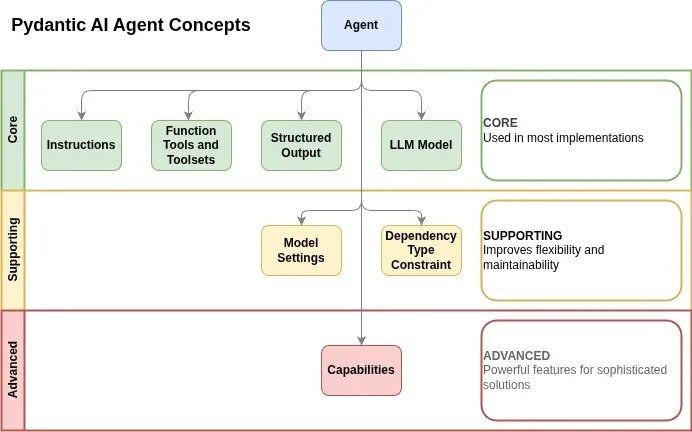
Suggested learning order for the Pydantic AI Agent: instructions, function tools and toolsets, structured output, models, dependencies, model settings, and capabilities.
This isn’t an official Pydantic AI learning path. It’s simply the order I chose while getting familiar with the framework.
Start With the Agent
The Agent is Pydantic AI’s primary abstraction.
Conceptually, you can think of it as a container that brings together several related concepts:
 Instructions
- Function tools and toolsets
- Structured output
- Models
- Dependencies
- Model settings
- Capabilities
I think that understanding how these pieces fit together is more important than memorizing the API, and once the overall picture makes sense, the implementation details become much easier to absorb.
Core Concepts
These are the concepts I’d focus on first.
In my experience, they’re the ones you’ll encounter in the majority of implementations.
Instructions
Instructions are exactly what they sound like. They provide guidance to the model about:
- how it should behave
- what role it should perform
- any constraints it should follow.
Most developers working with LLMs already understand system prompts, so this tends to be one of the easiest concepts to grasp.
What I’d focus on:
- Static instructions
- Dynamic instructions
- When instructions are sufficient
- When logic belongs elsewhere
One thing worth remembering is that not every problem should be solved with a larger prompt.
As your applications grow, other mechanisms often become more maintainable.
Function Tools and Toolsets
This is where agents start becoming genuinely useful.
Tools allow the model to interact with external systems, retrieve information, execute code, or perform actions on behalf of the user.
Many real-world agents spend a significant amount of their time calling tools rather than generating text.
What I’d focus on:
- Basic tool creation
- Tool descriptions
- Parameter handling
- Toolsets
If I had to identify a single concept that unlocks practical agent development, tools would be near the top of the list.
Structured Output
Structured output is one of the areas where Pydantic AI really shines.
Rather than hoping the model returns data in a particular format, you can define a schema and have the output validated against it. This opens up a wide range of use cases:
- Classification
- Data extraction
- Content generation
- Workflow automation
- API integration
Once you become comfortable with structured output, many AI workflows become significantly easier to reason about.
LLM Models
The final core concept is the model itself.
Pydantic AI intentionally keeps model concerns separate from agent concerns. This separation becomes increasingly valuable once you start experimenting with different providers and model families.
Initially, I’d focus on understanding:
- Model selection
- Provider configuration
- Swapping models
- Basic model capabilities
Most of the more advanced configuration can wait until later.
Supporting Concepts
Once you’re comfortable with the core concepts, I’d move on to the supporting layer.
These features improve flexibility and maintainability but aren’t necessarily required to build your first useful agent.
Dependency Type Constraints
This might be the first concept that feels unfamiliar to developers who are new to Pydantic AI.
Dependencies provide a structured way to pass application services and runtime state into tools, instructions, and other parts of the agent.
Rather than relying on global variables or tightly coupled implementations, dependencies make those relationships explicit.
If you’re already comfortable with dependency injection concepts from other frameworks, this will probably feel familiar.

Not only can you use dependencies to pass information into an agent, but they can also help reduce unnecessary tool calls.
For example, if you already know the user’s friendly name, it may be more efficient to fetch it beforehand and pass it as a dependency rather than creating a tool specifically to retrieve it.
Model Settings
Eventually you’ll want more control over model behavior. That’s where model settings come in.
Examples include:
- Temperature
- Token limits
- Timeouts
- Provider-specific configuration
These settings are important, but they’re usually easier to appreciate once you’ve already built a few agents.
Advanced Concepts
Capabilities
Capabilities are the concept I’d leave until last. Not because they’re unimportant, but because they’re easier to appreciate once you’ve experienced some duplication.
Capabilities allow related functionality to be packaged into reusable units. Instead of repeatedly configuring the same tools, hooks, instructions, and settings, they can be composed and reused across multiple agents.
For larger projects, that can become extremely valuable. For somebody learning the framework, however, I’d focus on understanding the fundamentals first.
Final Thoughts
One of the things I like about Pydantic AI is that many of its concepts build naturally on top of one another, and you don’t need to understand every feature before you can start building useful agents.
A surprisingly large number of useful agents can be built with little more than:
- Instructions
- Tools
- Structured output
- A model
The remaining concepts become increasingly valuable as your applications grow in complexity. Once you’re comfortable with those foundations, topics such as multi-agent patterns, graphs, durable execution, and long-running workflows become much easier to approach.
At least, that’s the path I’d follow if I were learning the Agent class from scratch today.